


Crownplay Casino Mobile App
Crownplay Casino Mobile App
Hey you, if you love playing on the go, our CrownPlay Casino mobile experience is exactly what you want in your pocket. You’ll get the same slots, live tables, jackpots, plus full sportsbook and Bonus Crab, all running smoothly right in your mobile browser or as a shortcut-style web app on your home screen. Let’s dig into how to set it up and what you can do with it every time you unlock your phone.
Crownplay Casino Mobile Experience Overview
Here’s the thing: CrownPlay is fully mobile, so you can place bets on thousands of games and sports events while you’re commuting, chilling on the couch, or watching the match with friends. You don’t need a heavy native CrownPlay app from a store, because the whole site is built as a responsive web platform that works like an app on Android and iOS once you add it to your home screen. All casino sections, like Slots, Live Casino, Jackpots, and Sportsbook, plus features like Bonus Crab, Shop, Challenges and Tournaments, are available in mobile mode with the same promos and odds you see on desktop.
Big plus, navigation is optimised for thumbs: burger menu brings you to Casino, Live Casino, Jackpots, Sports, Live Betting, Virtual Sports, Challenges, Tournaments, Bonus Crab, Shop and VIP in just one tap. You’re not locked out of anything on mobile, including payments, VIP levels, and support, so your phone or tablet can be your main way to play. Everything is protected with the same license and security as desktop, since we’re regulated by Curaçao 8048/JAZ under Nova Forge Ltd, founded in 2023.
How to Install the Crownplay Web App
Now, instead of searching for us in a store, you turn CrownPlay into a web app (PWA) by adding a shortcut to your home screen. That gives you full-screen launch, an icon like a native app, and faster access with saved login if you choose. It’s quick on both Android and iOS, and you can remove it anytime, like any other app icon.
Adding Shortcut to Home Screen on Android
On Android, you open CrownPlay in Chrome, play a bit, then add it to your home screen in a couple of taps. If the automatic install prompt doesn’t pop up, you can do it manually via the browser menu. After that, you’ll see a CrownPlay icon on your home screen that opens the site in a standalone window, without the browser UI, just like a classic APK.
Steps look like this on Android:
- Open CrownPlay in Chrome and wait a few seconds.
- Tap the three-dot menu in the upper-right corner of the browser.
- Scroll down, hit “Add to Home screen” and confirm; optionally rename the shortcut.Once done, the browser adds the icon, and tapping it takes you straight into CrownPlay with one touch, no typing the URL each time.
Installing the PWA on iOS Devices
On iOS, you’ll use Safari’s share menu to add CrownPlay to your home screen, and the result behaves very similarly to an installed mobile app. Once added, it opens in a standalone view with our logo and interface, and you get a clean experience without Safari’s address bar in the way. It’s perfect if you like quick access to your favourite slots or live sports markets with a single tap.
To set it up on iPhone or iPad:
- Open CrownPlay in Safari.
- Tap the icon with the arrow coming out of a box (the Share icon) to open the menu.
- Scroll the options and tap “Add to Home Screen”.
- Choose the shortcut name (for example, “CrownPlay”) and confirm; iOS drops the icon onto your home screen.
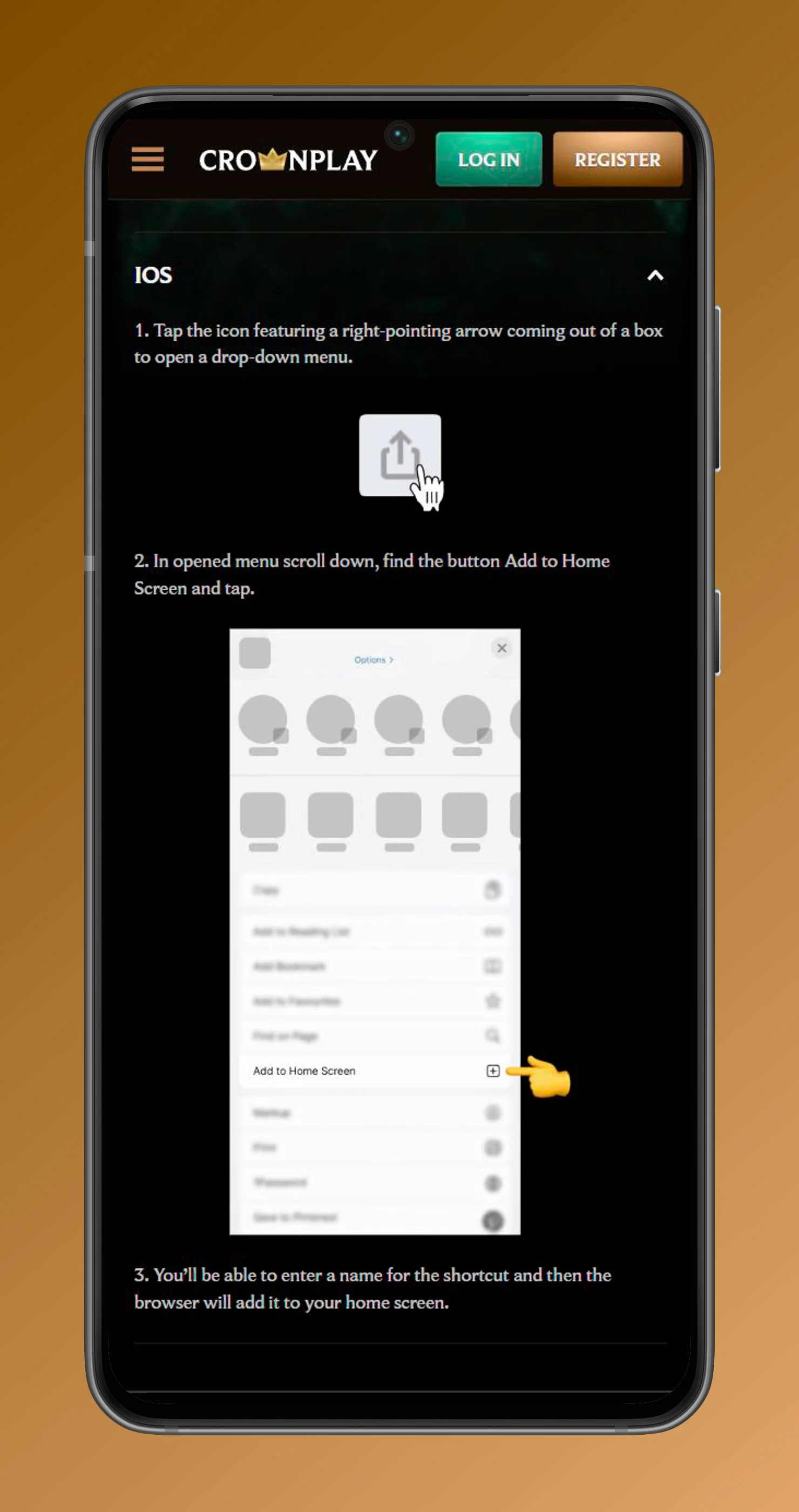
From then on, you just tap the icon, and you’re in directly, no extra browser steps.
Accessing via Mobile Browser
If you don’t want to add a shortcut yet, you can still access everything through your regular mobile browser. Just enter the CrownPlay URL, log in or register, and you have the full product: casino, live casino, jackpots, sportsbook, live betting, virtual sports, tournaments, shop, Bonus Crab, help centre and payments. The layout is responsive, so game tiles, category tabs like TOP, NEW, POPULAR, EXCLUSIVE, BONUS BUYS, LIVE GAMES, MEGAWAYS, and all sports categories are easy to scroll and tap on smaller screens.
You’ll also see the same promo blocks on mobile as desktop, such as “Exchange your Coins for 1,000 rewards”, “Join our Tournaments – win 6,000,000!”, and “Grab 300 with Bonus Crab!” with clear SHOP NOW or PLAY NOW buttons that are tap-friendly. So you’re not losing out by staying in the browser, but adding the shortcut just makes it quicker.
Mobile Games and Sports Betting
On mobile, you get all the same verticals you see on desktop: Casino, Live Casino, Jackpots, Sports, Live Betting, and Virtual Sports, just in a mobile-optimised format. You can swipe through categories, use the “Games, Categories, Providers” search bar, and open any game in full-screen mode so it feels native. Sports fans can jump from casino to sportsbook in one tap via the header or side menu, and place bets on football, tennis, basketball, ice hockey, American football, baseball, and more.
Mobile Slots and Jackpots
You’ll find hundreds of slots available from the mobile lobby, grouped into TOP, NEW, POPULAR, EXCLUSIVE, BONUS BUYS, LIVE GAMES and MEGAWAYS, so you can filter what you’re in the mood for quickly. Each slot opens with mobile-friendly controls and supports demo or real mode, so you can test them before placing real bets, just like on a desktop. Jackpots have their own sections, such as Daily Jackpots, Hot Jackpots, New Jackpots, Lucky Jackpots, Jackpot Play, and All Jackpots, and all of those are accessible on your phone too.
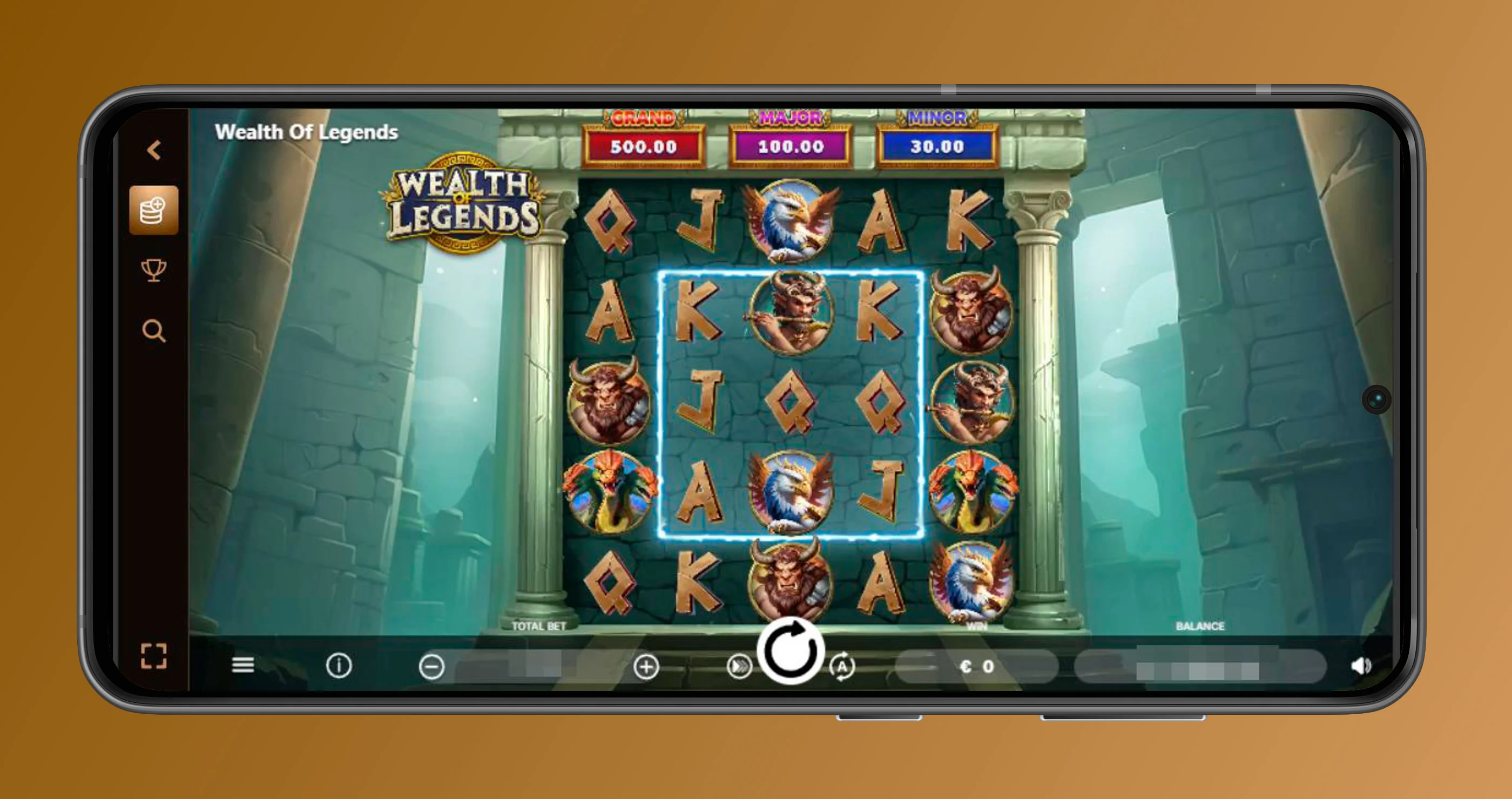
At the CrownPlay app-style platform, if you prefer instant games, like Aviator, or arcade-style titles, you can tap into Instant Games and other quick categories through the Casino menu, and these load cleanly on touch screens. You can switch between games without logging out, and the quick search helps you jump right back to your favourites that you recently played.
Live Dealer Games on Mobile
If you’re into live casino, CrownPlay mobile site lets you play Live Roulette, Live Blackjack, Baccarat & Dice, Poker, Game Shows and special lobbies like Gold Saloon and Top Live Casino, all streamed with real dealers. The interface adapts to portrait and landscape, so you can pick what feels best, and betting chips are big enough for comfortable tapping even on smaller screens. You still get all the same live sections like International Tables and All Live, so you’re not missing any table options on mobile.
The idea is that you get that realistic feel – hearing the ball on the wheel and cards being shuffled – but with the convenience of playing from your phone in bed or on the move. You can jump between different live lobbies or go back to slots and sports without reloading your login on mobile, either.
Mobile Sportsbook and Live Betting
Our sportsbook is fully usable on mobile, with categories like Sportsbook, Live Betting, and Virtual Sports right in the menu, plus quick links to football, tennis, table tennis, basketball, ice hockey, American football, and baseball. You can scroll through events, open markets, place singles or accumulators, and then follow live odds shifts in the Live Betting section, all from the same hand. Esports and VR sports, like VR basketball or football, are also reachable under Virtual Sports, giving you something to bet on 24/7 when real sports are quiet.
You can switch from casino to sports with one tap, meaning you could spin a few slots, then slide to a football live match and take a position before the next whistle. All standard tools, like your bet slip, open bets, and settlements, are accessible via mobile navigation menus.
Key Features of the Mobile Platform
Our mobile platform is built around simplicity: everything important is reachable in 2–3 taps, and the UI is cleaned up so the most-used sections, like Casino, Live Casino, Sports, Live Betting, Bonus Crab, Shop, VIP Levels, and Payments, are always visible from menus or footers. On top of that, support via live chat, access to Help Centre, and shortcuts like “Create Shortcut” are available directly from the mobile footer and side menus. You get the same features as a desktop, just arranged to play nice with small screens and touch input.
Mobile Navigation and Interface
Navigation is handled through a header with logo, search, Login/Register, and a side menu (sidebar) icon, and a full navigation list with items like Promotions, Home, Casino, Live Casino, Jackpots, Sports, Live Betting, Virtual Sports, Challenges, Tournaments, Bonus Crab, Shop, and VIP Levels. Tapping these takes you to mobile-optimised pages, with grid-based game tiles, large category headers, and clear CTA buttons like PLAY NOW or SHOP NOW on promotions. There’s also a search bar labelled “Games, Categories, Providers” that is visible at the top, letting you quickly find a specific slot, provider, or game type on mobile.
The layout ensures you don’t have to pinch and zoom; everything is sized for tap accuracy and readability. If you scroll down, you’ll also find quick links and navigation lists in the footer grouped by Casino, Live Casino, Jackpots, Sports, Security and Privacy, Promotions, and Payments, all accessible on mobile.
Account Management and "My Account" Features
From mobile, you can log in using the same credentials and then manage your entire profile: access VIP Levels, Promotions, Shop, Bonus Crab, Challenges, and more. The footer navigation exposes links like About Us, Help Centre, Create Shortcut, Sitemap, Casino game categories, Live Casino sections, Jackpots categories, Sportsbook, Live Betting, Virtual Sports, Responsible Gaming, Privacy Notice, and Terms and Conditions, so you can handle settings and info from your phone. You can also reach Payments, view available payment methods, and access support options, including live chat, directly from the mobile footer.
Your “My Account” area (once logged in) lets you see balances, bonuses, opt-in to promos, and work with VIP, all using the same layout logic as desktop but adjusted for mobile. You can jump to the Help Centre for detailed articles or click Live Chat to talk to support without leaving your mobile browser window.
Mobile Deposits and Withdrawals
Payments are fully supported in mobile mode, with methods like Visa, Mastercard, Interac and others shown in the payments section you can reach from the footer link “Payments”. Tapping any payment method opens details and allows you to start a deposit or withdrawal directly in your mobile browser, with interfaces adjusted to small screens and big buttons. You get the same level of security and 18+ checks as desktop, since payment processing uses a shared backend and licensing.
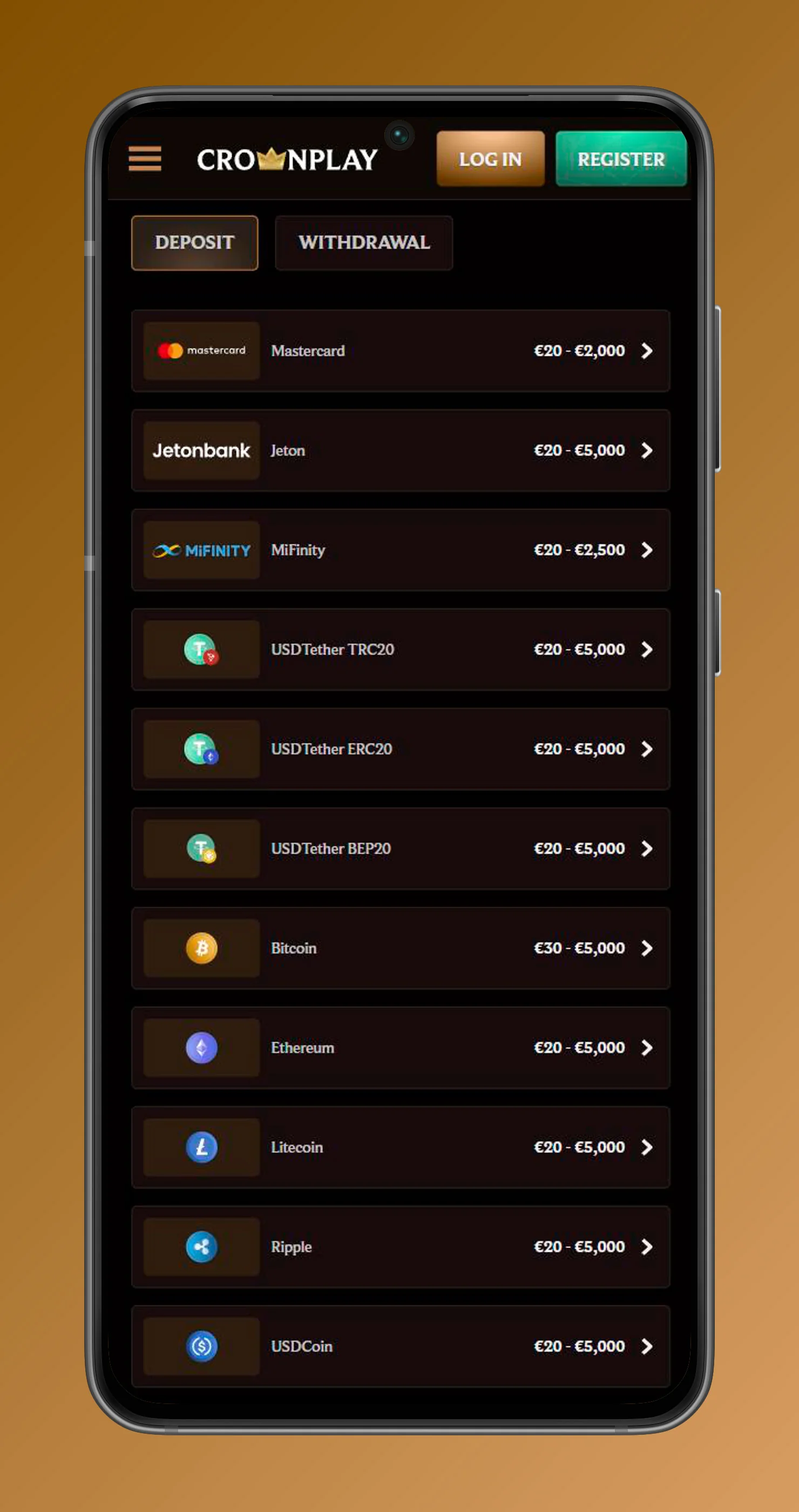
You can review the list of supported payment methods in the mobile footer and hit “More” to see full payment information. That means loading your account, cashing out wins, and checking transaction statuses can all be done from your phone or tablet, no desktop needed.
Mobile Bonuses and Promotions Access
All promos you see on desktop, like Welcome Package, Weekend Reload Bonus, Weekly Reload, Live Cashback, Weekly Cashback, Sweet Holiday Chases, Prize Drops, and more, are available and clickable on mobile via the Promotions pages and the main page specials blocks. You’ll see large promo tiles such as “Welcome Package 250% up to 3,000 + 350 FS + 1 Bonus Crab,” “Weekend Reload Bonus,” “Weekly Reload,” and “Live Cashback,” all with READ MORE and JOIN NOW calls to action that work perfectly on touch devices. Specials like “Exchange your Coins for 1,000 rewards,” “Join our Tournaments,” “Grab 300 with Bonus Crab,” and “Take on Challenges and earn 1,500 Coins” also show up on the mobile homepage and can be activated right there.
Claiming Welcome Packages on Mobile
You can claim the main casino welcome package or sports welcome offer directly from mobile by tapping the promo tile and hitting JOIN NOW or READ MORE to see full terms and start the registration flow. Sign-up, login, and first deposit can all be done from your phone, and once you deposit the required amount, your bonus and free spins are credited following the same rules and wagering as on desktop. That means your first big boost, like up to €3,000 plus free spins in the casino welcome, doesn’t require a PC to activate it.
You can then keep an eye on cashback, reloads, and special campaigns from the mobile Promotions menu, since all casino and sports promos are divided into “Casino,” “Sports,” and “Specials” sections that are mobile-friendly. So you can build your bonus strategy entirely on your phone if that’s how you like to play.
Accessing the Bonus Crab Feature
The Bonus Crab game has its own navigation item (“Bonus Crab”) in the mobile menu, so you can reach it in a single tap on mobile. It’s also promoted via a big “Grab 300 with Bonus Crab!” banner that appears in the specials section on the main page, with a PLAY NOW button you can tap to go straight into the feature. The mobile version of Bonus Crab works just like the desktop: you tap to play, use claws to grab rewards, and credits/spins/coins are added to your account or My Bonuses space.
You can do your daily Bonus Crab grabs on your phone without any problem, even if you never touch a laptop. For a lot of players, grabbing Crab rewards quickly from mobile during the day and then using them on slots or tables at night is the go-to routine.
Conclusion
Bottom line, our CrownPlay Casino mobile setup gives you the same full power of the desktop site – casino, live casino, jackpots, sports, live betting, Bonus Crab, Shop, Challenges, VIP, and Promotions – all wrapped in a clean, touch-friendly interface that can live on your home screen like a native CrownPlay app. Whether you add the PWA shortcut on Android or iOS or just use your mobile browser, you’ll have quick access to games, bonuses, and bets any time you reach for your phone. If you’re ready to take your play on the move, add the shortcut today and let your next big win happen wherever you feel like playing.